DKBezeler
Every framed iPhone screenshot and screen recording on this site goes through the same pipeline: I drop a capture in a folder and it comes out baked into a device bezel. DKBezeler is that pipeline, extracted into a CLI anyone can run. It looks at your capture’s resolution, picks the right device frame, and bakes one flat asset: a PNG that is transparent outside the phone, or a light/dark pair of videos with corners matched to your page. The DK prefix is of course an homage to NeXTSTEP’s NS prefixes.
See it
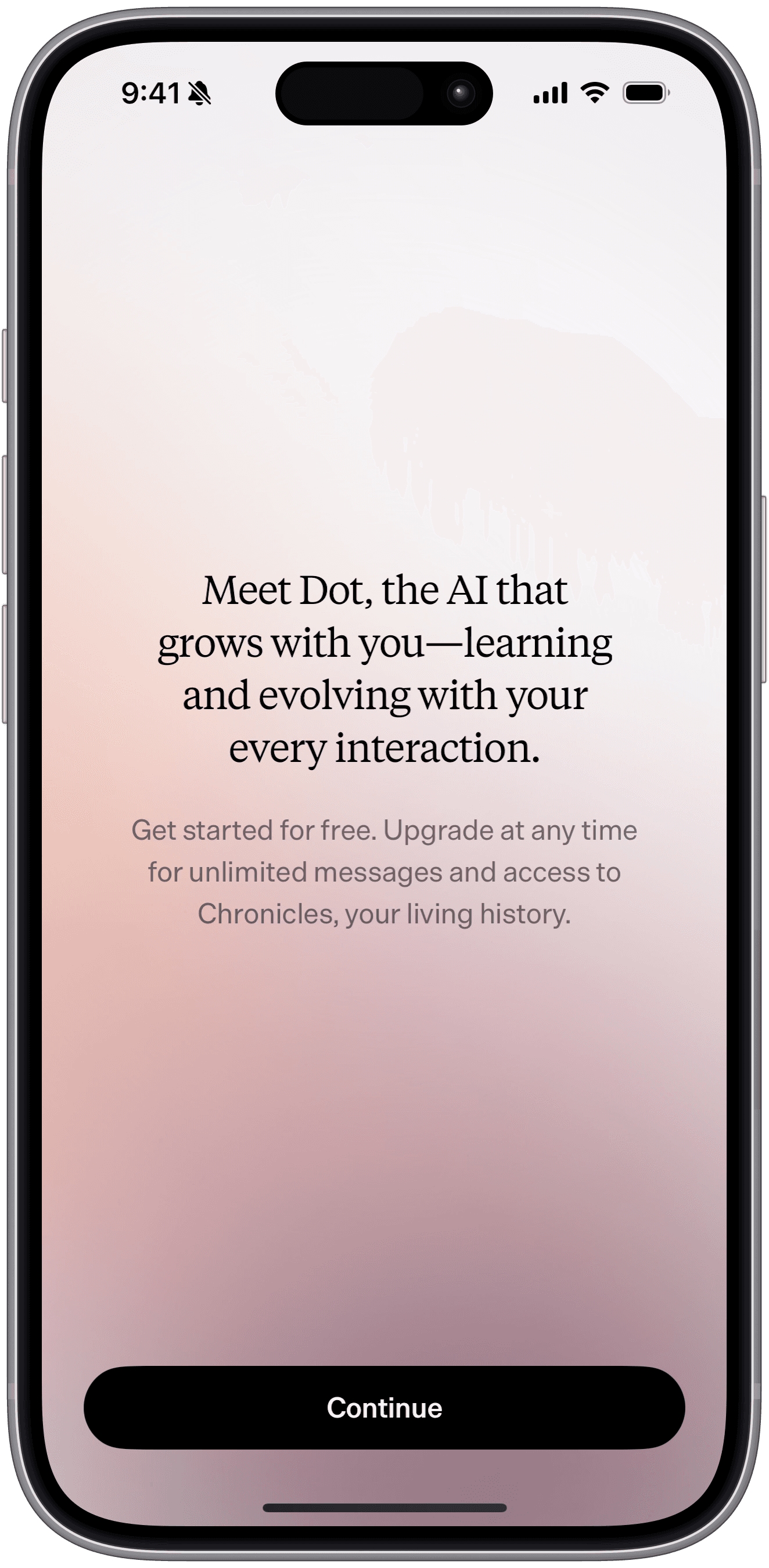
A raw iPhone screenshot from my Dot review and the PNG DKBezeler baked from it, exactly as the pipeline produced it:

And a baked screen recording. Toggle this site’s theme and watch the corners follow.
Start
npx @diklein/dkbezeler "Screen Recording.mov" --out public/img
npx @diklein/dkbezeler onboarding.png --out public/img
There is nothing to download first. The frame is drawn, not fetched: DKBezeler carries the millimetre geometry of every iPhone since the 12, transcribed from Apple’s accessory dimensional drawings, and renders the housing, the cover glass, the bezel, the Dynamic Island or notch, and the buttons for the phone that took your capture. No frame art ships with the package and none touches your machine.
Stills need nothing beyond the package itself. Baking screen recordings needs ffmpeg installed, and the CLI tells you if it is missing.
How it picks the phone
Your capture’s native pixel size names the phone that took it. 1206x2622 is an iPhone 18 Pro screen (and a 17 Pro’s), 1260x2736 an iPhone Air, 1170x2532 an iPhone 14. Where generations share a screen size the newest model wins, and --device picks another. The capture is never resampled: the frame is rendered at whatever scale makes its active area exactly your pixels, and an export a pixel or two off its native size loses those pixels to a whole-pixel crop.
Other devices
For a device the generator does not know, an iPad, a Watch, an Android phone, bring your own frame: any PNG of the device with a transparent screen cutout ringed by a solid bezel. DKBezeler measures everything it needs from the file itself, flood-filling the alpha channel to find the screen:
npx @diklein/dkbezeler measure my-frame.png --name "iPad Pro"Light mode; dark mode
Framed videos come out as a pair: a light version and a dark version, with corners baked to match each theme’s page background because H.264 has no alpha. Tell DKBezeler your two backgrounds once and every bake in the project matches your site:
npx @diklein/dkbezeler theme --light "#ffffff" --dark "#0f1317"The display component renders both versions and CSS shows the right one. On this site the swap is instant when you toggle themes. One subtlety the tool handles for you: near-black colors decode about one unit darker through video encoding, so it nudges the dark value accordingly and tells you when your corners are baking on defaults instead of your own colors.
The details that took the evenings
Around a phone’s rounded corners, the frame’s outermost pixels are antialiased. A naive composite lets the bright screen show straight through them: invisible on white, a crusty dotted rim in dark mode. DKBezeler recomputes every one of those pixels exactly from the frame’s own alpha on every bake. Videos additionally keep their real frame rate (a default ffmpeg pipeline quietly resamples 60fps recordings to 25). And because iPhone recordings store color on a different numeric scale than web video players expect, a naive re-encode shifts every color slightly on playback, enough to un-match your corners from your page. DKBezeler converts each clip to the scale the web assumes, so the baked colors are the colors that appear.
Display components
npx shadcn@latest add @diklein/dk-bezelerThis installs DKBezelImage and DKBezelVideo. A framed clip is two files, so DKBezelVideo puts both on the page and a CSS rule hides the one that doesn’t match the current theme. Toggling your site’s theme swaps them instantly with no JavaScript. The hidden file costs your visitors almost nothing. Browsers fetch only a small header for a video that isn’t displayed, so the wrong-theme clip never downloads or plays.